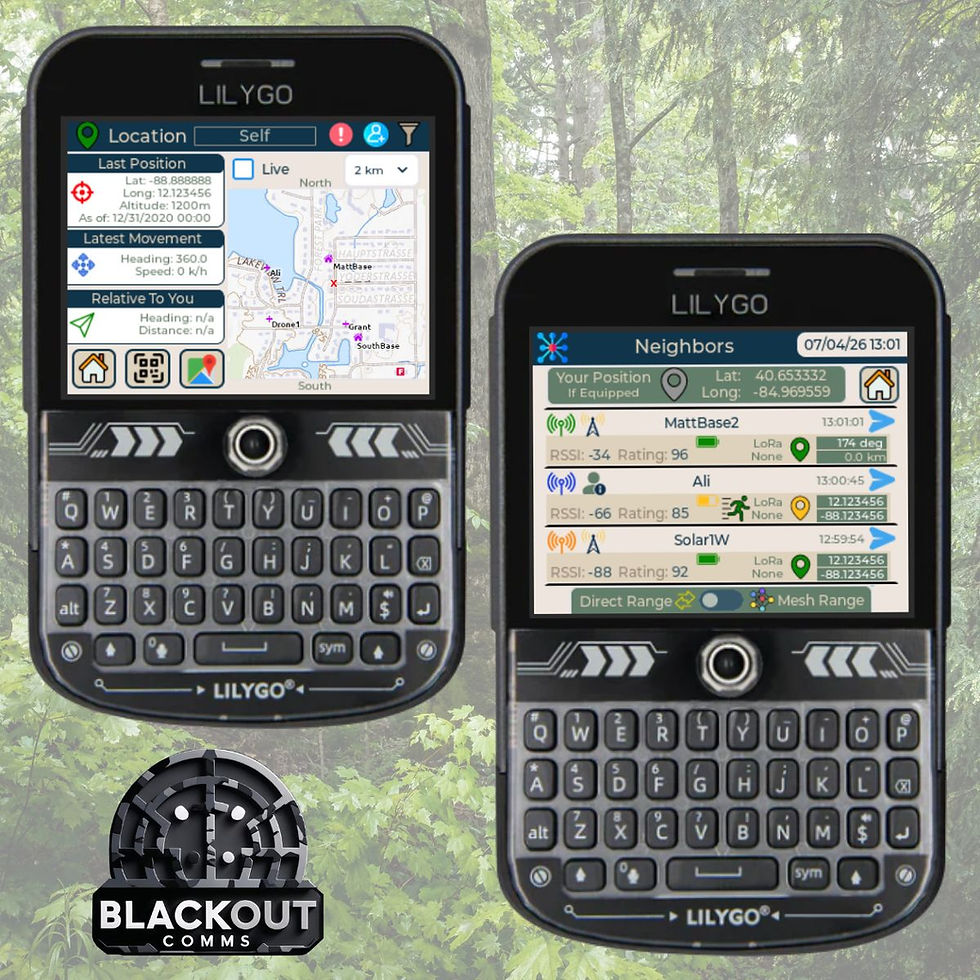
Blackout Comms Cluster Visibility: Live Maps, Mesh Traffic & Full Awareness (Mesh Memory in Action)

See your entire private mesh — active devices, offline nodes, RF topology, and live traffic — all from one Bluetooth connection.

When you run a Blackout Comms private mesh, the system works autonomously. But knowing exactly what your cluster is doing — who’s where, how the network is performing, and what traffic is flowing — makes it far more useful for family coordination, off-grid travel, or preparedness drills.
The Blackout Comms firmware builds the intelligence. The Blackout Comms Live Android app makes it visible. Together they deliver practical, cluster-wide situational awareness without any central server or internet.

How the Firmware Creates Cluster-Wide Knowledge
The firmware does the heavy lifting behind the scenes:
Adaptive Device Awareness — Devices automatically discover and trust each other. Information about presence, capabilities, battery, and status spreads across the cluster.
Location & Heading Propagation — Live and last-known positions, headings, and speeds are securely shared 24/7, even across multiple hops.
Mesh Memory — The decentralized cache remembers devices and data. Powered-off or out-of-range nodes stay visible at their last known location. Messages can be held for delivery later.
Smart Connectivity Sharing — The mesh knows optimal paths, even for devices that have never been in direct range.
Every device in your cluster carries a complete local picture of the whole network.
The App: One BLE Connection = Full Cluster View
Blackout Comms Live is your optional companion app (free, open source). Connect via Bluetooth Low Energy to any single device in the cluster. Because the firmware has already propagated the full state, you instantly see the entire cluster — not just nearby nodes.
This is the key integration: The firmware keeps the mesh smart and self-aware. The app gives you a clear dashboard on your phone or tablet.
Key Visibility Features in Blackout Comms Live
1. Live Cluster Map (with OSMDroid offline maps)

See every device in your cluster on one map.
Active devices update in real time (position, heading, speed, battery).
Offline/powered-off devices stay pinned at last known location.
Visual indicators for direct vs. multi-hop connections.
Time filtering and message overlays.
2. Mesh Graph + Live Traffic Monitoring

RF Topology Graph — View how devices are connected and link quality.
Live Traffic View — Real-time charts of packet/byte volume, mesh saturation, RSSI, direct vs. indirect pings, and unwanted traffic detection.
These tools answer real questions quickly: Is the mesh healthy? Where are coverage gaps? Is traffic flowing normally?
Real-World Example
On a family off-grid trip, connect your tablet to the base T-Deck. Instantly see:
Your spouse’s device 3 miles away, moving with 78% battery.
A solar repeater acting as a strong bridge.
A pager offline but still pinned at its last known trailhead position.
Healthy traffic levels with no congestion.
Send messages or adjust node placement based on real data.
Why This Matters for Off-Grid Use
Full visibility without compromising the no-infrastructure design.
Optimize deployments and troubleshoot easily.
Better situational awareness for family safety or group operations.
Scales as you add more nodes (repeaters, Go Kits, etc.).
The firmware keeps everything resilient and private. The app makes it observable when you need it.
Get Started with Cluster Visibility
Update your devices to the latest Blackout Comms mesh firmware.
Download Blackout Comms Live from the Google Play Store or GitHub.
Connect via Bluetooth to any device in your cluster and explore the Map and Traffic views.
Resources
Ready to see your mesh cluster clearly? Flash the latest firmware, open the app, and check what your mesh is really doing.