


Blackout Comms® Live - For Android

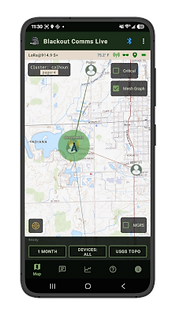


-
Send/receive secure broadcasts & direct messages
-
Analyze what's going on with your mesh cluster at any given time
-
See a live map of all your device positions & movements
-
Monitor mesh traffic and signal strength
Demo (Care Package Dropoff)
In this demo, you can see how Blackout Comms Live gives real-time visibility in a simulated operation. The app gives my partner a live, remote, and off-grid view of the entire event.
At all times, the encryption, anti-jamming frequency hopping, & other security features of Blackout Comms are in full force.
The Simulated Care Package Operation
-
Assemble a "care package" (food, a communicator, etc)
-
Drive 8 miles into a remote wooded area and hide the package with a powered off communicator inside
-
Partner observes the entire operation live from the "home base"
-
Hours later, use a completely different device that was powered off the whole time & locate the care package using "Mesh Memory"

.jpg)
Device Status
Shows the live status of your currently connected Blackout Comms device. This is available on every tab of the app, and gives you all the vitals of your device.
-
Current LoRa frequency is shown. This changes as your device hops frequencies
-
Temperature inside device, if your Blackout Comms device has an onboard DS3231 realtime clock or other compatible temperature sensor
-
Mesh connectivity status - this tells you if you're receiving direct pings from other devices and what the average strength is
-
Stealth mode status - stealth mode helps you hide or reduce your RF footprint, at the expense of being less visible to other trusted devices. Learn more: mesh stealth modes.
-
GPS fix status of your connected device - green means live fix, yellow means stale
-
Battery level
Map View
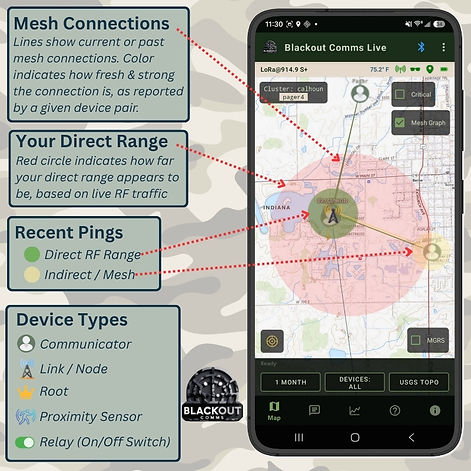
The map view shows a live view of what your mesh-connected device is seeing right now, as well as in the past. Each device has its own view of what the mesh cluster looks like right now.
-
Map tiles are automatically downloaded as needed. Once downloaded, they're stored so you still have them, even with no internet connection.
-
See your current position (as reported by the connected device, not your phone)
-
See all other known devices, as well as their most recently-known position. Arrows indicate movement in a direction.
-
See live and evolving connectivity throughout your cluster.
-
Devices that are powered-off or out of range will still show, if you have the time filter set to long enough.
-
Green or yellow bubbles around a device indicate you've received a direct (green) or indirect (yellow) ping from the circled device.
Mesh-connected devices are helping one another stay up to date with position information, connectivity information, and more, any time they are powered on.

Messages View
Send and receive messages from your phone or tablet, routed through your Blackout Comms communicator.
-
Messaging is completely off-grid, end-to-end encrypted, and signed, for maximum security
-
Messages are sent instantly, if the intended recipient is in range
-
For out of range devices, mesh techniques are used by your Blackout Comms device
-
All of the Blackout Comms decentralized mesh packet store, frequency hopping, and smart mesh routing are utilized
-
New messages and status updates (message confirmations) automatically appear
- New messages also pop up on the map view automatically

Mesh Traffic View
The mesh traffic view displays a live-updating chart of encrypted packets and bytes flowing in and out of your connected device.
This can help you easily see RSSIs, how "busy" your RF traffic is, and other useful things. When looking at pings, there are direct pings and indirect pings.
Direct pings are received directly from the device shown. This means you received some Blackout Comms packets directly from the device and that its within RF range (RSSI shown).
Indirect pings are information about the displayed device, received from a different device. Indirect pings can come for a device that's in mesh range, out of mesh range, or even powered off.