


Using Blackout Comms
Secure, Easy to Use, Expandable
-
Blackout Comms is easy to use, even by those unfamiliar mesh technology
-
Most devices are touchscreen and work similar to a texting app
-
Security is built-in and automatic (message signatures & encryption)
-
New devices can be flashed and added to your private cluster in minutes
-
To alert you, your device will vibrate, flash, and/or beep, depending on your hardware. The Heltec v4 will flash screen. Our custom T-Deck will vibrate or beep, other T-Decks will flash screen or beep. The Lilygo Pager will vibrate and flash screen.


Message Delivery
-
Direct messages & broadcasts
-
DMs to in-range devices are sent and confirmed instantly, while out-of-range /powered off deliveries are routed via mesh
-
Signed delivery confirmations for DMs, cluster-accepted confirmation for broadcasts
-
Payloads are always encrypted and signed
-
Unpredictable frequency hopping for higher security and jam-resistance, DMs “striped” across multiple frequencies
Neighbors View - Direct Range
-
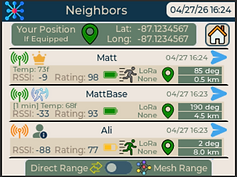
View all trusted devices currently within LoRa range
-
Touch GPS icon to see relative location of nearby devices (if location sharing enabled)
-
RSSI helps you position nodes and antennas
-
Messages to neighbors are likely to be instantly sent and confirmed as meshing is likely unnecessary
Neighbors View - Mesh Range
-
View devices currently not in direct RF range, but likely reachable via meshing
-
This may include devices multiple hops away, or even powered off devices

Mesh Capabilities
-
Decentralized “mesh cache” securely stores and delivers packets until expired
-
DMs can be held/delivered by the cluster for up to 24 hours, broadcasts up to 2 hours
-
Asymmetric encryption ensures nodes/devices assisting in deliver cannot decrypt DMs
-
Cluster-wide connectivity, device presence, and location updates regularly as knowledge propagates throughout the cluster 24/7


Adaptive Device Awareness
-
Auto-propagating knowledge of devices and capabilities as they’re added to the cluster
-
Chain of trust allows devices to automatically trust & recognize new devices
-
Cluster-wide connectivity sharing enables smart path planning, even for devices that have never been within direct LoRa range
-
Last known and/or current locations and headings for all devices (with sharing enabled) are securely propagated cluster-wide

Location Sharing
-
All locations are encrypted during transmission and at rest
-
Live location data is shared directly to in-range devices, via mesh to out-of-range devices
-
If a device is powered off or out-of-range, the last known location is shown
-
Although no compass is integrated, a line will show your heading while moving
Remote Commands / Sensors
-
Remotely view query any enabled device for its in-range neighbors, battery level, uptime
-
Remotely enable/disable GPS, DST, and adjust time zone for any enabled device
-
Proximity nodes accept commands related to enabling/disabling motion notification, querying last motion, and more
-
Experimental relay nodes enable remotely opening and closing circuits (switching on/off)
-
Remotely wipe/factory reset any device (only root can do this)

Highly Configurable
-
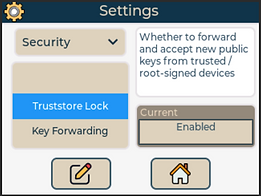
Adjustable device and security settings
-
Cluster configuration options (when you create a new cluster) include name, center frequency and hopping settings
-
New devices automatically adjust to the cluster’s settings once they are onboarded by the root
-
You assign each communicator a name when you initialize it. That name/alias sticks with the device
-
Nodes are automatically assigned a random name.